
Ask any facilities or security manager what they spend the most time on and "lost cards" is near the top of the list. New joiners waiting for a card, someone stuck outside because they forgot theirs, a visitor tailgating in behind a resident, a card that should have been deactivated but wasn't. Every one of those is a small crack in the wall you have paid to build. Face-first access closes them by making the credential something a person cannot misplace, forget or pass to someone else. This guide walks through why cards and PINs fail, how touchless face access actually works, and how the same doorway can quietly handle visitors and attendance at the same time.
Why cards and PINs fail
Cards, fobs and PINs all share one flaw: the credential is separate from the person. That gap is where security leaks.
- They get lost. Cards live in wallets, lanyards and coat pockets, and they go missing constantly. Every lost card is an open door until someone notices and deactivates it — and a helpdesk ticket, a replacement fee and a frustrated employee locked outside in the meantime.
- They get shared. A card cannot tell who is holding it. Lend it to a colleague "just for today", prop a PIN on a sticky note by the reader, and your access log now records a person who was never actually there. For attendance and audits, that quietly turns your records into fiction.
- They get cloned. Many common proximity cards can be copied with cheap, widely available hardware in seconds. The clone reads as genuine, so the system never knows the difference.
- Tailgating. The oldest trick of all: one valid person opens the door and two, three or four walk through behind them. No card is presented, no record is made, and your "secured" area now holds people you cannot account for.
- They linger after they should be dead. An employee leaves, a contractor's job ends, but the card keeps working until someone remembers to switch it off. That gap between "should not have access" and "actually loses access" is a common and avoidable risk.
PINs are no better — they are shared over the shoulder, written on desks and reused across doors. The pattern is the same everywhere: the moment the key can be separated from the person, it can be lost, borrowed or copied. Face-first access removes the separable key entirely.
How face-first access works
The idea is simple: the person is the credential. Instead of presenting something you carry or something you remember, you present something that is already, unavoidably, you. A camera at the door does the rest, and the whole exchange takes place in the moment a person walks up — no reaching for a wallet, no tapping a keypad.
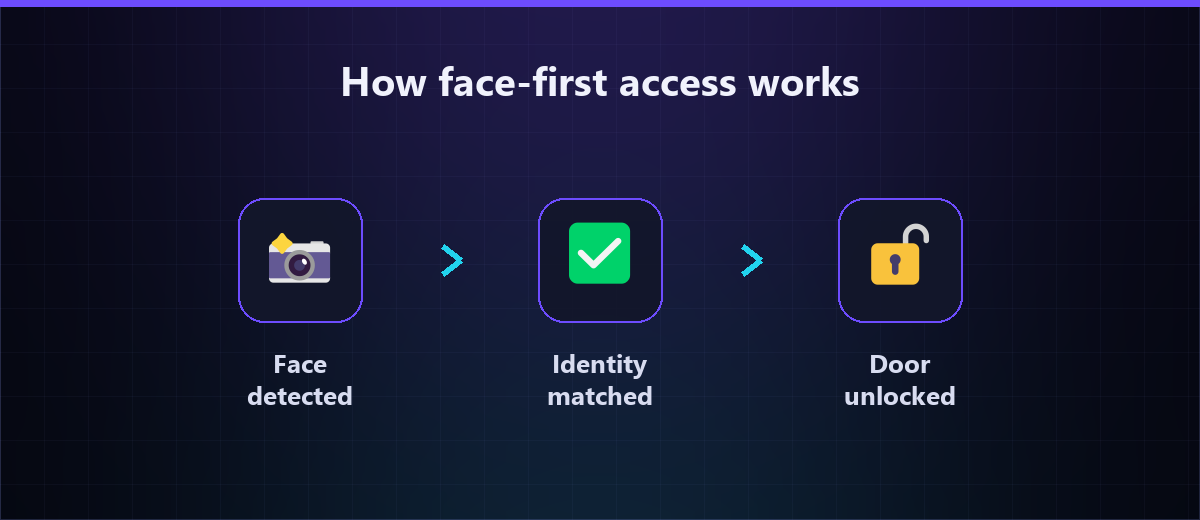
Under the hood, our face-first access control runs a short, dependable loop:
- Recognise. A camera at the door detects that a face is present in the frame as the person approaches.
- Match. The face is compared against your enrolled directory of staff, residents or members to establish who it is.
- Open. On a confident match against someone who is allowed through that door at that time, the controller releases the lock or opens the barrier. No match, no entry — and the attempt is still logged.
Enrolment is a one-time step: each person is registered once, usually from a single clear photo, and from then on the door simply knows them. The recognition engine itself is the same core behind our face recognition API and SDK, which means the doorway is powered by a purpose-built vision model rather than a bolt-on. Because entry is touchless, it is also faster and more hygienic than a shared reader or keypad — people keep walking, hands full or not.
A practical benefit worth naming: there is nothing to hand out and nothing to collect. Onboarding a new hire is a photo, not a plastic card order and a courier. Off-boarding is a click that removes them from the directory, and their access is gone at every door at once — no chasing down a card that was never returned.
Visitor management and blacklists
A door that recognises your own people should be just as good at handling everyone else. Face-first access folds visitor management into the same system rather than leaving it to a paper register at reception.
Known visitors and expected guests
Regular visitors — a contractor on a two-week job, a partner who visits weekly, a parent at a school — can be enrolled temporarily with an access window that expires on its own. They pass smoothly while they are meant to, and stop being recognised the moment their window closes, with no card to reclaim and no manual clean-up.
Unknown faces
When someone the system does not recognise arrives, the door does not simply open. The event is captured with a snapshot and routed the way you choose — to a guard for a manual check, into a visitor sign-in flow, or held pending approval. Reception moves from copying names into a notebook to handling only the genuine exceptions.
Blacklists
Just as an allow-list holds the people who should pass, a block-list holds the ones who should not. An ex-employee with a grievance, a person barred after an incident, someone flagged by security — add them once and every camera on the network watches for them. If a flagged face appears at any covered door, staff are alerted immediately rather than finding out after the fact from footage. Every entry, exit and denied attempt is written to a searchable, image-backed log, so "who was in the building at 4pm?" becomes a query, not a guess.
Attendance is built in
Here is the part that turns a security upgrade into an operations upgrade: if the door already recognises each person to let them in, it already knows exactly who arrived and when. Entry doubles as attendance — for free.
There is no separate biometric clock to buy, no queue at a fingerprint reader, no forgotten swipe to reconcile at month-end. The same walk-through that unlocks the door stamps a clean, tamper-resistant record: this person, this door, this time. Because the credential cannot be shared, buddy-punching — one worker clocking in for an absent colleague — simply stops being possible. The attendance you record is the attendance that actually happened.
Those records flow naturally into your people systems. Feed them into our HRMS and entry and exit times become the raw material for shift tracking, overtime and payroll, without a manager keying anything in by hand. We cover this pairing in depth in our guide to face recognition for attendance — the same technology, viewed from the HR side of the door rather than the security side. For a factory, a hospital, a campus or a housing society, one deployment quietly solves two problems that used to need two vendors.
Works offline and across sites
A door has to open whether or not the internet is up. Face-first access is designed to keep working at the edge — the recognition and the unlock decision happen locally at the door, so a dropped connection or a slow link does not leave people stranded outside. When connectivity returns, logs sync back to the central record; the door never waited on the cloud to let a resident in.
The same design scales cleanly across sites. Enrol a person once and authorise them across every location they are entitled to, managed from a single dashboard. A company with offices in three cities, a chain of clinics, or a builder running several societies can push one directory and one set of rules everywhere, rather than maintaining a separate box of cards at each gate. Because it builds on standard IP cameras and your existing access control hardware where possible, you can start with the one door that matters most and expand as the results earn it — no rip-and-replace to get going.
Getting started
You do not have to convert every door on day one. A sensible rollout looks like this:
- Pick one door. Choose the entrance that causes the most friction or carries the most risk — usually the main lobby or the server room — and start there.
- Enrol your people. Register staff, residents or members from a single clear photo each. This is the whole "issuing credentials" step, done in minutes.
- Set the rules. Decide who may pass which door and when, add any temporary visitors, and load your block-list.
- Wire the lock. Connect the decision to your existing door controller so recognised people pass automatically and exceptions route to a guard.
- Expand. Once the first door proves out, add gates and floors, switch on attendance, and extend to your other sites from the same dashboard.
The goal is a building where the right people walk straight in, the wrong ones are caught at the threshold, and the record of both is something you can actually trust — with nothing to lose, share or clone.
Ready to retire the plastic card? See how our face-first access control ties recognition, visitor management and attendance into one doorway, then book a demo and tell us about your busiest entrance — we will show you what it takes to open it with a face.